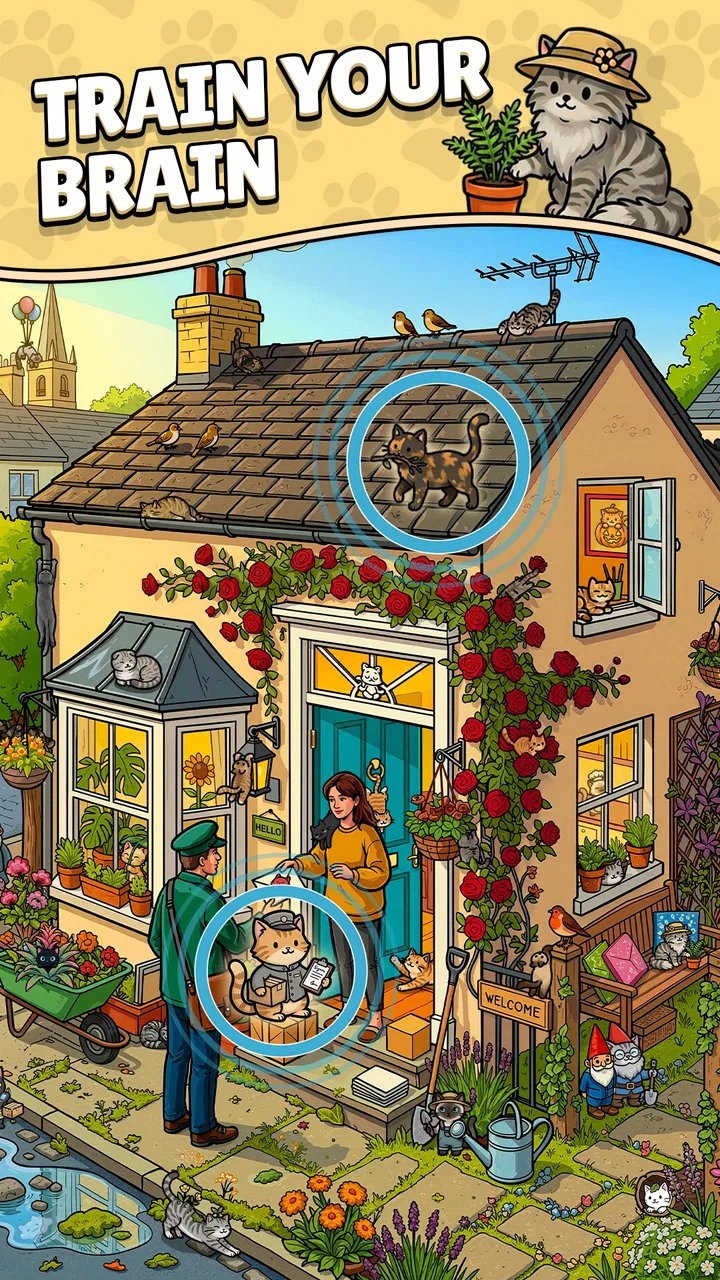
Find The Cat 2 - Spot It!
- 4.9
- Rating
- 1.00M
- Installs
- Free
- Price

 Analysis by App-foxy
I went into Find The Cat 2 expecting a simple hidden-object distraction, and that is exactly where its appeal begins. The idea is easy to understand: look closely, identify the cats, and keep moving. What surprised me is how quickly that basic task turns into a small test of attention. It is the kind of puzzle I can open for a short break without first learning a complicated system, yet it still rewards patience when the obvious cats are gone.
This is a free puzzle game from Agave Games, aimed at Everyone and available for devices running Android 10 or later. The store summary is essentially the whole premise—find all the cats—but the experience depends on how carefully I approach each scene. It is not a story-heavy adventure or a competitive brain-training tool. Instead, it works best as a visual search game for people who enjoy scanning illustrations, noticing small differences, and getting a clean sense of completion from each solved screen.
The game has already attracted over a million installs, with an average rating of 4.9 from around 53 thousand ratings. Those figures suggest that its straightforward format is connecting with a broad audience, but they do not remove the need to understand its limits. A relaxing hidden-object game can still become tiring if the scenes feel too dense, if progress depends on repeated tapping, or if you prefer puzzles with deeper rules. My experience is that this one succeeds most when I treat it as focused downtime rather than a long-form challenge.
You May Also Like

 Blood Strike: 2.5 Anniversary
Blood Strike’s Loadouts Turn Every Drop Into a Tactical Gamble
A close look at Blood Strike’s custom loadouts: how fast access to signature weapons reshapes its battle royale rhythm, rewards preparation, and narrows the gap between fights.

 Pandora - Music & Podcasts
Pandora’s Music Is Easy to Start, but Harder to Recover
Pandora’s strength is its low-effort path from a seed to a station. Its weak spot is how much confidence it asks you to place in connection, setup, and quiet recovery.

 8 Ball Pool
 Is Built on Rivalries, Rematches, and Routine
A close look at the rivalries, rematches, shared routines, and unanswered safety questions that turn a quick pool match into a persistent mobile community.

 Samsung Music
’s Quiet Strength Is Playing What You Already Own
Its reach comes less from spectacle than from dependable access to a personal library. That simplicity is both the app’s strongest retention engine and its ceiling.

 AccuWeather: Weather Radar
AccuWeather Review: A Quick, Clear Forecast for Everyday Decisions
For everyday plans, the best forecast is the one you can understand quickly. AccuWeather makes rain timing, radar, and local conditions easy to act on, with a few trade-offs.

 Hill Climb Racing
Why Hill Climb Racing Still Turns Crashes Into One More Run
A tiny car, a bumpy hill and one more upgrade: Hill Climb Racing keeps resurfacing because its simple chaos makes every near-miss feel personal.
More From Our News Desk
View All News


How the basic search loop feels in everyday play
The first few moments are immediately accessible. I do not need to memorize controls, manage an inventory, or follow a long tutorial before solving anything. The central habit is visual scanning: I move across the image in an organized way, checking corners, edges, crowded areas, and places where a cat can blend into the surrounding design. That simplicity makes it suitable for a quick session while waiting for an appointment or taking a break between tasks.
A useful everyday scenario is playing with one hand while sitting on a train or waiting for someone. I can start a puzzle, inspect the scene, and stop once my attention begins to fade. There is no need to commit to a long multiplayer match or remember a complicated storyline. At the same time, I would not call it mindless. When the picture becomes busy, I have to slow down and separate actual shapes from visual noise, which gives the session more substance than simply tapping randomly.
My best baseline workflow is to scan from left to right, then repeat the process from top to bottom. I avoid jumping directly toward the most colorful object because that creates blind spots. After one broad pass, I inspect the margins and unusually empty spaces. Cats hidden near a border are easy to overlook when I focus only on the center, and a methodical route is more reliable than trusting the first impression of the scene.
Another practical habit is to pause after finding several cats instead of immediately tapping around the remaining area. A short reset helps me notice the visual style of the scene again. When I keep searching while frustrated, every shape starts to look suspicious. Taking a breath and beginning a second pass with a different priority—first silhouettes, then faces, then color contrasts—usually works better than increasing the speed of my taps.
The interface is at its best when I use it as a visual inspection tool rather than treating it like an arcade game. I prefer deliberate touches over rapid guessing. Random tapping may feel faster for a moment, but it makes it harder to understand where I have already searched and can turn a calm puzzle into a messy exercise. The game rewards attention more naturally when I give each section of the picture a clear purpose.
Why the simple format works for casual players
There is a pleasant lack of pressure in the main idea. Someone who rarely plays puzzle games can understand the objective immediately, while an experienced player can refine a search routine. That broad accessibility is one reason I can recommend it to families and casual players who want something gentler than a timed match-three game. The Everyone rating also fits the approachable presentation and uncomplicated premise.
It is especially suitable for players who like visual details but do not want word puzzles, number grids, or logic chains. If you enjoy looking through illustrations for small objects, the format feels natural. It can also work for a child and an adult sharing a device, because the adult can guide the scanning process without needing to explain complex rules. The main caution is that younger players may still need help if a scene becomes crowded or if they start tapping everywhere instead of searching.
For me, the strongest emotional reward is not surprise but closure. Finding the last difficult cat gives the scene a finished feeling, and that makes the game easy to return to when I want a small accomplishment. It does not try to overwhelm the player with systems. That restraint is a strength, although it also means people looking for character development, strategic planning, or a large progression structure may find the experience too narrow.
Settings and device habits that are actually worth checking
Before settling into regular play, I would check the available in-game settings rather than assuming the default arrangement is ideal. The most useful approach is not to search for imaginary shortcuts or advanced tools, but to make sure the basic presentation feels comfortable on the particular phone or tablet being used. Screen brightness, text readability, touch accuracy, and the way the device is held can all affect a visual search game more than they affect a typical menu-driven puzzle.
I prefer a brightness level that keeps pale details visible without making the screen harsh. On a small phone, I hold the device slightly farther away during the first broad scan, then bring it closer only when I am checking a suspicious corner. That two-distance routine reduces the temptation to zoom my attention onto one object too early. If the display is very bright or reflections are strong, subtle shapes can become harder to distinguish, so choosing a comfortable viewing position matters.
Orientation and grip are also worth considering. I use both hands when a scene is particularly dense because it lets me keep the device steady while inspecting small areas. When playing casually, I use one hand, but I avoid covering the edge of the screen with my thumb. That sounds minor, yet a finger placed over a border can hide exactly the sort of location that deserves a second look.
Sound is a personal choice rather than a core part of my workflow. I often play quietly in public places, and the game remains useful as a visual activity without requiring a loud environment. If you enjoy feedback, keeping the device at a modest volume can make discoveries feel more satisfying, but I would not choose this game because of audio. Its identity comes from the pictures and the search process.
It is also sensible to keep the app updated through the normal platform process. The current version is 1.13.1, and using that version gives me the clearest baseline for the present experience. I would not install it on a device below Android 10, because that is the stated minimum operating system. For iOS users, the appropriate store listing and device compatibility should be checked before downloading, rather than assuming every phone or tablet handles the game in the same way.
The game is free to download, which makes trying it low-risk. However, in-app purchases range from $2.99 to $8.99 per item. I would treat those purchases as optional spending and decide in advance whether I want a completely free session or am comfortable paying for whatever extras the game presents. The important practical point is to avoid turning a difficult puzzle into an unplanned purchase decision. If I am stuck, I first change my search method and take a break instead of immediately reaching for a paid solution.
Faster patterns that improve accuracy
The fastest players are not necessarily the ones who tap most quickly. They are usually the ones who reduce repeated searching. My preferred pattern is a three-stage scan. First, I inspect the full composition to understand its major zones. Second, I check likely hiding places such as borders, clusters, and areas with similar colors. Third, I revisit only the sections that produced uncertainty. This keeps me from restarting the entire picture every time I miss one cat.
Color is useful, but it should not be the only clue. A cat may be easier to recognize through its outline, face, ears, or position than through its overall color. I deliberately switch between shape-based and color-based searching. That change is one of the most effective ways to break a visual blind spot, because the eye can become accustomed to one feature and ignore another.
I also divide a busy scene into imaginary rectangles. I finish one zone before moving to the next, while giving the outer edge a separate pass. This is more dependable than following whatever object catches my attention. If a scene contains repeated patterns, I compare similar areas rather than inspecting them in isolation. A shape that seems decorative in one location may stand out when I notice that its neighbors do not contain the same detail.
When only one cat remains, I stop using the same search style that found the earlier ones. The final target is often difficult precisely because it does not resemble the obvious examples. I look for an unusual interruption in the artwork, a small face-like arrangement, or a shape that seems slightly out of place. I do not assume the last cat will be near the previous discovery, and I avoid tapping every object simply because the remaining target is frustrating.
These habits also make the game more pleasant for children. Instead of giving away the answer, an adult can ask the child to search one section at a time, then switch from looking for colors to looking for ears or faces. That turns the session into a shared observation exercise. It is a better use of the game than simply taking the device and solving the scene for them.
Where the challenge reaches its limits
The game’s focused design is also its main limitation. Finding cats is satisfying, but the underlying activity does not offer the variety of a puzzle collection with wordplay, physics, deduction, and strategy mixed together. If you need constant mechanical change, this may feel repetitive after several sessions. I would choose a broader puzzle app when I want a different kind of challenge each time I open the phone.
It can also be a poor fit for players who dislike visual ambiguity. A hidden-object scene depends on careful interpretation, and a missed cat can feel less like a logical mistake and more like an attention failure. Some people find that relaxing; others prefer puzzles where every answer follows a clear rule. If you want a game that rewards calculation or planning rather than observation, this is probably not the right first choice.
Small screens can make the experience less comfortable, especially for players with tired eyes or limited patience for inspecting tiny details. A tablet-sized display may be preferable when available, although the game remains most convenient on a phone because it is easy to open during short breaks. I would avoid playing for a long stretch in poor lighting. The visual search can become tiring even when the game itself remains calm.
There is another trade-off in the free model. The no-cost entry is welcoming, but optional purchases can change how each player approaches a difficult moment. I prefer to set a personal rule: finish a scene through observation first, and only consider spending if I have already decided that the purchase is worthwhile. Players who want a completely uninterrupted, purchase-free experience should pay attention to how they feel about the game’s monetization before investing a lot of time.
The high average rating of 4.9 and the large audience are encouraging signs, but they should not be read as proof that every puzzle fan will enjoy the same rhythm. Ratings often reflect how well a game satisfies its intended audience, and this game is clearly aimed at people who like accessible cat-finding puzzles. Its strengths are focus, ease of entry, and visual satisfaction—not deep systems or endless strategic variety.
Who should install it, and who should skip it
I would recommend it to someone who wants a free, low-commitment puzzle for short sessions, especially if they enjoy hidden-object illustrations and quiet observation. It is a good choice for a family device, a casual player returning to games, or anyone who likes the feeling of completing a small visual task. The simple objective also makes it easy to demonstrate to a friend without explaining a long set of rules.
I would be more cautious about recommending it to a player who needs competitive leaderboards, a strong narrative, or a complex upgrade system. It is also not my first choice for someone who becomes irritated by searching the same image repeatedly. In those cases, a traditional logic puzzle, a word game, or a broader collection with several mechanics would provide more variety and clearer problem-solving rules.
For experienced users, the best way to get more from it is to build a repeatable routine rather than chase speed. Check the screen comfortably, scan in zones, change the type of clue you are using, and take a short break when your attention starts to flatten. Those habits do not add fictional features to the game; they simply make the existing search task more manageable and reduce the frustration of random tapping.
My final view after settling into the routine
Find The Cat 2 is a focused puzzle game that understands the value of a small, clearly defined goal. Agave Games keeps the central activity easy to start, while the visual layouts give careful players enough reason to slow down and refine their method. I like that I can use it for a few minutes without feeling that I have abandoned a larger campaign, and I appreciate the way a successful search creates a neat sense of completion.
Its limits are equally clear. The format may become repetitive for anyone seeking broad mechanical variety, and dense scenes can be tiring on a small display. The optional purchases, priced from $2.99 to $8.99 per item, are another reason to play with a spending boundary in mind. Those points do not undermine the game, but they do define the audience it serves best.
My verdict is positive for casual visual-puzzle players. I would install it when I wanted a gentle search game, recommend it to a friend who enjoys finding details in busy pictures, and keep a different puzzle title available for days when I wanted logic, words, or strategy. If your ideal break is a quiet hunt for one more cleverly placed cat, this free game is an easy one to try. Its real strength is not complexity, but the satisfying discipline of looking carefully.
FAQs for Find The Cat 2 - Spot It!
01What is Find The Cat 2 - Spot It!?
Find The Cat 2 - Spot It! is a casual hidden-object puzzle game focused on locating well-camouflaged cats in detailed scenes. Each level challenges you to carefully examine the image and tap the cat when you spot it. The game is easy to understand, but later stages become more demanding as cats blend into busy backgrounds and distractions make them harder to find.
02How do you play Find The Cat 2 - Spot It!?
The main gameplay is simple: study the scene, search for the hidden cat, and tap it as quickly and accurately as possible. Players need good observation skills rather than complicated controls. Depending on the level design, taking your time can be more useful than tapping randomly, since incorrect touches may reduce your score or affect the available hints.
03Is Find The Cat 2 - Spot It! suitable for children?
Find The Cat 2 - Spot It! is generally suitable for players who enjoy relaxed visual puzzles, including children and families. The controls are straightforward and the objective is easy to understand. However, parents should still check the app’s current age rating, advertising, in-app purchase options, and privacy information before allowing younger children to play without supervision.
04Does Find The Cat 2 - Spot It! require an internet connection?
Some parts of Find The Cat 2 - Spot It! may work offline, particularly if the necessary levels and game resources are already installed on the device. Nevertheless, an internet connection may be required for advertisements, updates, online features, analytics, or restoring purchases. For the most reliable experience, open the game once while connected before playing away from Wi-Fi or mobile data.
05Is Find The Cat 2 - Spot It! free to download and does it contain ads?
The game can typically be downloaded without an upfront payment, but free access may be supported by advertisements or optional in-app purchases. Ads can appear between levels or during other parts of the experience, while purchases may provide hints, remove advertising, or add extra content. Review the store listing carefully because pricing and monetization can vary by platform and region.
Pros
- Simple rules make it easy for children and casual players to start.
- Bright illustrations make the hidden-cat scenes enjoyable to explore.
- Short levels suit quick play sessions during breaks or travel.
- Finding different cats can keep younger players engaged and motivated.
- Works well as a light observation and concentration game.
Cons
- Some levels may feel repetitive after extended play.
- Small details can be difficult to see on phones with compact screens.
- Progression may offer limited variety for experienced puzzle players.
- Hints or extra features may depend on ads or in-app purchases.
- You may need to replay scenes to improve scores or complete objectives.

Find The Cat 2 - Spot It!
Gallery